Translating CiviCRM
CiviCRM is written with English-language code and strings for display. Using, Transifex CiviCRM is able to translate the entire interface into dozens of different languages for the use of many different organizations worldwide. Each local language can be installed locally, and then CiviCRM is able to use this base.
Localizing CiviCRM
After completing your initial setup of CiviCRM you should be able to further configure your instance with regional settings.
The Localization screen (shown in the following screenshot) lets an administrator select the right locale for the language and country of the organization using CiviCRM. Go to: Administer > Configure > Global Settings > Localization.
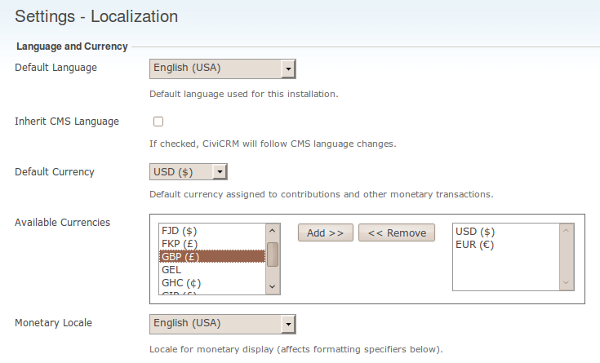
Translating Your CiviCRM
CiviCRM accommodates different languages, however the developers rely on the community to translate the text displayed where translations are missing or a specific language is not integrated.
Presently, there are several different ways to translate your own custom labels and strings into the languages you wish. We are aiming to migrate this all into one system eventually.
Mapping Languages to Specific Regional Translations
In some cases, you might want to properly map the language you have added to CiviCRM to a more localized version. A common example is that of Canadian French being much different than that of French from France.
To use fr_CA instead of fr_FR (for France French), which is the default
you can modify your civicrm.settings.php file with the following code.
define('CIVICRM_LANGUAGE_MAPPING_FR', 'fr_CA');
See CRM-9558 for more information.
Technical
As a basic understanding the way that words are retrieved are as the following:
- The system takes the existing string within a translation call (in English)
- It checks the current language of the user, and then if it's different than the default (English US) that all strings are referenced against it will attempt to find the appropriate translation.
- It first scours the
.mofiles that are downloaded and installed for different languages - If no matching translation is found, it will then attempting to lookup the strings from the translation repository, and if none are found there it will then continue to look for the strings within the particular (older) translation columns for each custom field and/or option value/group
FAQ
What if I notice strings are not translated
If it's within a custom extension then normally you can contact the author, and propose translations.
CiviCRM is also built by volunteers and we encourage the community to provide translations via the online translation tool Transifex to find out about your language of interest. Download and install it on your CiviCRM installation to find out how well it will suit your needs.
More information can be found here.